News, Updates and Other Minutiae
August 2019
Website outage - I made some hosting changes and there was a minor hiccup. Hopefully everything is now back to normal but please let me know if anything is missing.
The start of a new project added in the Homebrew category. Specifically, a Frequency Dependant Switch. Measures the incoming frequency and switches 1 of 8 outputs on. Software for this project uploaded.
June 2019
Added another project for the AD9850 DDS modules. A Simple DDS sweeper in the Homebrew section. This is an absolutely basic, no frills project using a 12F1840 to sweep a DDS module between a range of frequencies. Plenty of scope for you to improve on the software and add extra features.
Privacy Policy uploaded. It may be viewed at the Privacy Policy link in the footer.
Custom code/webhost costs
I have, for quite a while, provided modified versions of the code for my projects free of charge. However, the cost of webhosting for this site has tripled in the last few of years and shows no signs of getting any cheaper.
As of October 2017, I will be asking for a donation in exchange for providing custom modified code for my projects to help keep this site available.
GPDR and all that stuff
In accordance with various bits of legislation around the world, either currently in force, about to come into force or proposed, you will now find that annoying "We use cookies" notice at the top of this website. Please note that the ONLY cookies currently used on this site are for that pop-up (see https://cookieconsent.insites.com/) and Google Analytics. The full Privacy Policy is available at the Privacy Policy link in the footer at the bottom of the page. (If you don't know what GPDR is, Google it. Real scary shit for ANYBODY with a web presence.)
PCB Information - Making your own
I use Sprint Layout to lay out my pcb's. Rather than mess around creating pdf's of pcb's, I will post the Sprint Layout file. There is a free viewer available to download below, which will allow you to view and print these files if you want to make your own pcb's. For the actual process of making pcb's, there is already plenty of information on the subject, on the internet, so I will not repeat it here. Everybody has their own favorite method of making pcb's.
Unfortunately, the help file of the viewer is sadly lacking, so I have put some notes here to help you.
The viewer does not install anything, so just put it in any folder you wish and click (or double click) the exe to start it.
Once running, use the FILE menu to open the pcb file. They have an extension of LAY6. Unlike the main drawing program, the colours you see when a file opens are not changeable. Also, any ground plane area's that may be in the pcb do not show, but they WILL print. Use the PRINT SETUP option to select your printer and PRINT, obviously, to print the file.
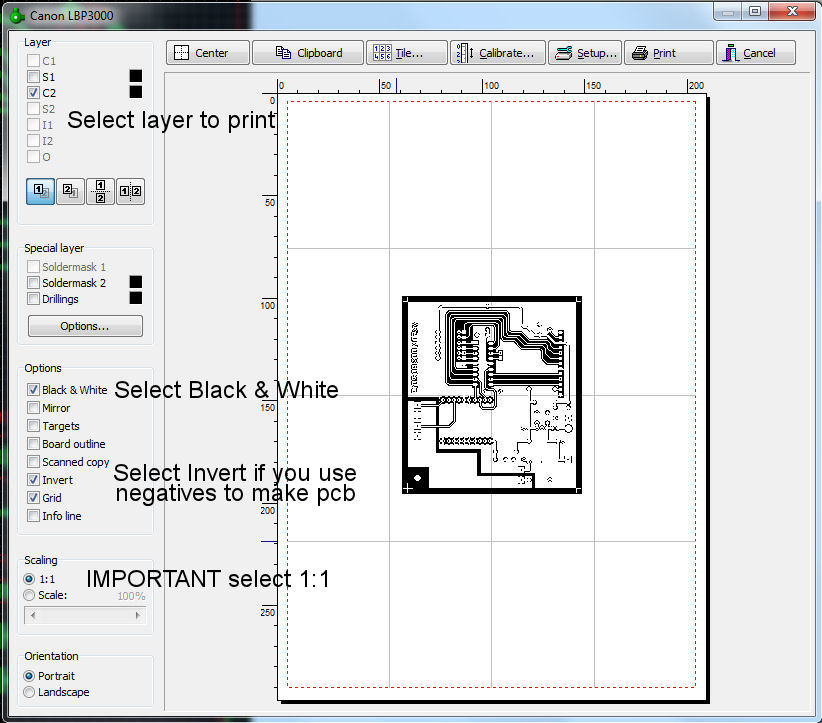
When you click PRINT, you will be presented with a page like the image below. Rather than write a whole screed on the various options available, I have labeled the pic with text so you can get the print out of your computer as quickly as possible. If your print comes out the wrong size, read the information under Calibrate Tab below. (Click picture for larger view. Click again to close.)
You can explore the other tabs and find out what they do at your leisure.
Calibrate Tab
Some printers may need a calibration to produce printouts that are exactly true to scale.
Example: A line has a length of 100 mm but the printer produces a line with a length of 101 mm.
In that case enter a factor of 100 mm / 101 mm = 0.99 for correction (.990099 to be precise). The printer will then print true to scale. This correction factor will not save, you have to enter it every time you restart the program.
Nov 2017 - As of the latest update, the printer calibration factors now save and do not have to be entered every time.
To help with this calibration, download and open the 'Printer calibration file'. there is a cross of 100mm in each direction. Print this file and accurately measure the lengths in both directions and enter the calculated calibration numbers in the boxes.
Files to download.
Sprint Layout viewer This is linked directly to the suppliers download. Approx 3mb download.
Printer calibration file
