News, Updates and Other Minutiae
August 2019
Website outage - I made some hosting changes and there was a minor hiccup. Hopefully everything is now back to normal but please let me know if anything is missing.
The start of a new project added in the Homebrew category. Specifically, a Frequency Dependant Switch. Measures the incoming frequency and switches 1 of 8 outputs on. Software for this project uploaded.
June 2019
Added another project for the AD9850 DDS modules. A Simple DDS sweeper in the Homebrew section. This is an absolutely basic, no frills project using a 12F1840 to sweep a DDS module between a range of frequencies. Plenty of scope for you to improve on the software and add extra features.
Privacy Policy uploaded. It may be viewed at the Privacy Policy link in the footer.
Custom code/webhost costs
I have, for quite a while, provided modified versions of the code for my projects free of charge. However, the cost of webhosting for this site has tripled in the last few of years and shows no signs of getting any cheaper.
As of October 2017, I will be asking for a donation in exchange for providing custom modified code for my projects to help keep this site available.
GPDR and all that stuff
In accordance with various bits of legislation around the world, either currently in force, about to come into force or proposed, you will now find that annoying "We use cookies" notice at the top of this website. Please note that the ONLY cookies currently used on this site are for that pop-up (see https://cookieconsent.insites.com/) and Google Analytics. The full Privacy Policy is available at the Privacy Policy link in the footer at the bottom of the page. (If you don't know what GPDR is, Google it. Real scary shit for ANYBODY with a web presence.)
The original project page that was here is available as a zip file to download in the "Old Files" section at the bottom under "Downloads".
November 2019 - pcb's still available. A new batch of pcb's are available for this project which can also be used for the Xtal Substitute project. Cost is $6 AUD each ($6.60 each in Australia) plus postage. I can also supply a programmed PIC with your frequencies for $10 ($11 Australia) + postage Use the contact page to get in touch with me to order.
Simple DDS VFO - 2017 Update
A Simple DDS based VFO using an 8-pin PIC.
It is a VFO that can be used just as an ordinary transistor/fet VFO would be. This has been kept as simple as, any bufffering, amplification or filtering is left up to you to build to suit your purposes. Yes, I have been fiddling again. The changes are - the inputs used for the Encoder and Calibration/Step switch have changed and a rearranging of some of the components on the pcb, plus, using a push button (or encoder push button), 3 step sizes of 10Hz, 1kHz and 10kHz are available. I swapped the inputs around as I need a port line not associated with the encoder that can be either an input or output for an add-on that I have in mind (if it works). Note that to use the original software (or any of the modified versions I supplied prior to this update) with this pcb, fit the 100n capacitors marked as 1 on the schematic below and connect the encoder to inputs 'A' & 'B' and the Cal/Step switch to 'C'. Do not fit the capacitors marked as 2.
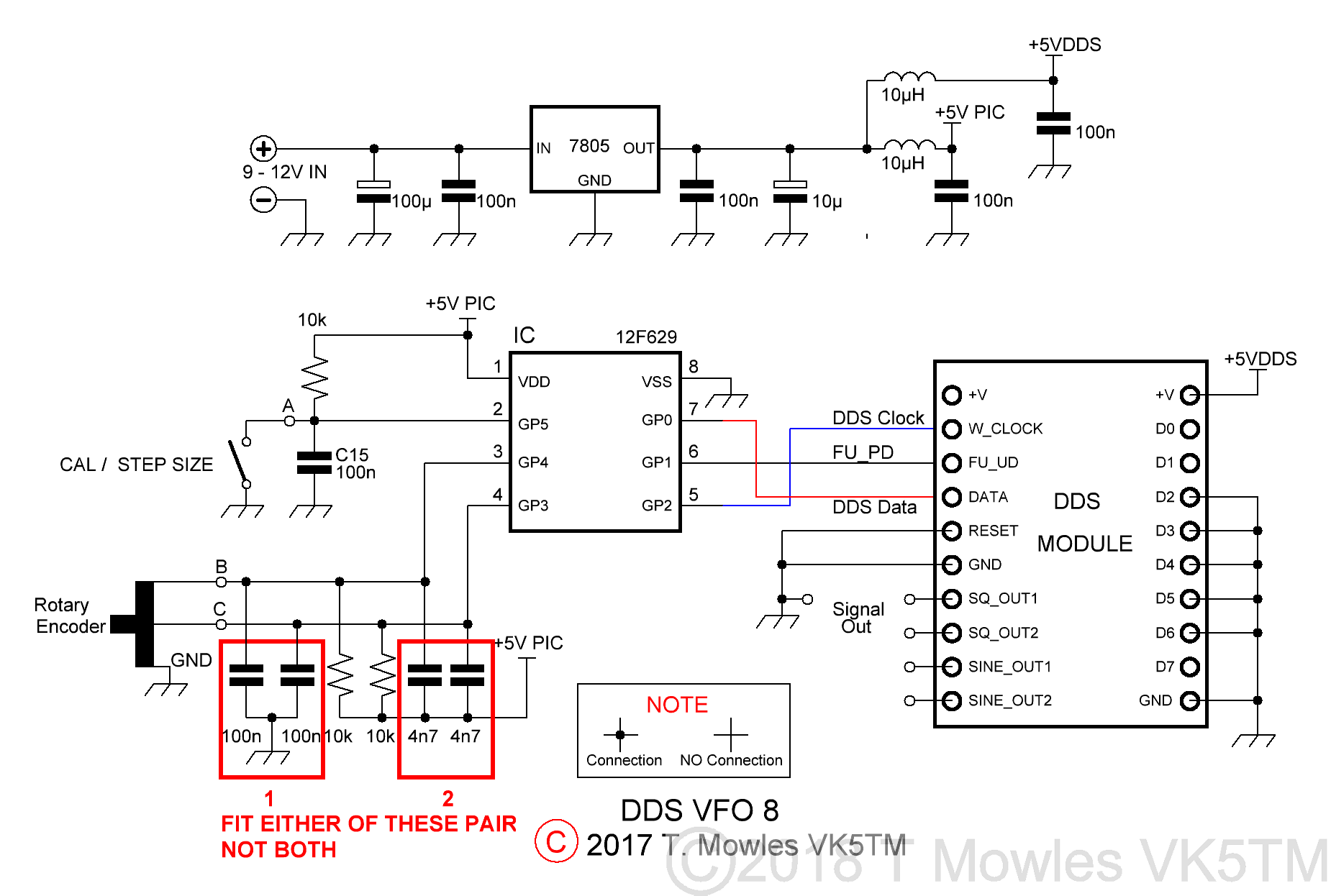
If you have one of the 3.3v modules, all that needs to be done is to replace the 7805 with a 3.3v regulator. The PIC will happily run at 3.3v and it doesn't control anything but the DDS module, so no other interfacing problems.
A note about the two sets of capacitors marked '1' & '2' - with the cheap mechanical encoders I have been using, I found that having the capacitors in parallel to the 10k resistors (marked '2' on the diagram) resulted in a much better waveform from the encoder. Other, better quality encoders may be different, so on this version of the pcb, I have given the option of the more traditional arrangement for the capacitors (those at '1') as well. You can decide which ones you want to install.
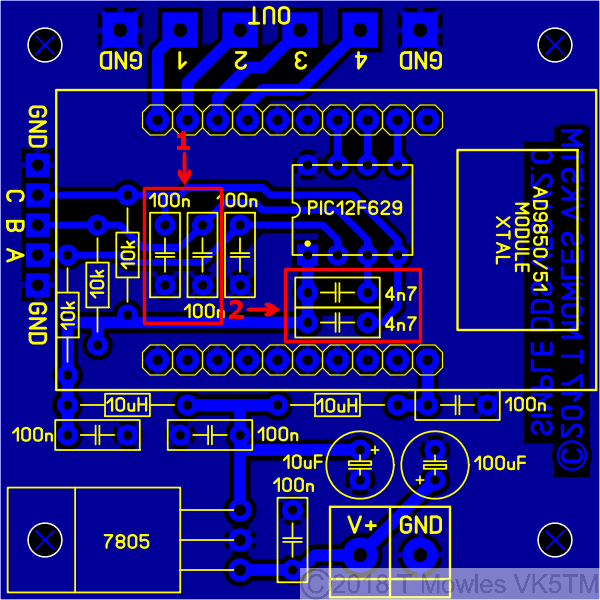
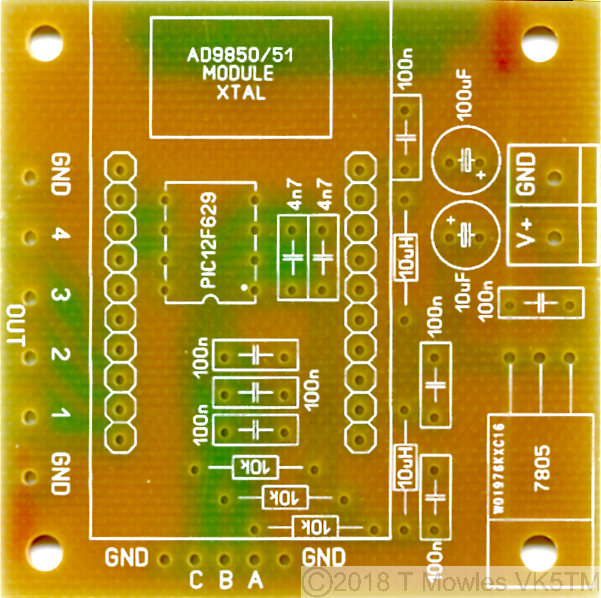
The pcb is only 2 inches (50.8mm) square. You can use either the AD9850 Module or the same format AD9851 module.

Software
A few words about the software. You will need to input the values of and recompile the software for your required VFO frequency: Limit - The upper limit frequency you want the VFO to reach. Limit_Low - The lower limit frequency you want the VFO to go down to. Default - The default start frequency - this will be overwritten during operation by your last used frequency, it is just the first time start up default (it must be within the VFO range above). Cal_freq - The Calibration frequency - This is the frequency the unit needs to be adjusted to during the calibration procedure. I suggest making it in the middle of your VFO range. If you use MPlab to compile the software, the above are between lines 97 and 122 in the asm file (but may move around a little depending on version updates). In the file available to download below, the frequencies are 5.5MHz, 5.0MHz, 5.0MHz & 5.250MHz in order as listed above. There is no limit to the frequency range of the VFO other than that of the AD9850 or AD9851, so your limits could be 1Hz and 40MHz if that is what you wanted, but it will take a very long time to get from one end to the other in 10Hz/1kHz/10kHz steps (those of a programming bent can add extra step sizes if desired). At each power-up, the step size is set to 10Hz and each subsequent push of the step switch advances the step size by 1 i.e. - to 1kHz and then 10kHz. Another push of the button steps back to the 10Hz step size. One point to note: Until the calibration is done, you need to make sure that the 'CAL/STEP' input is not held low when first turned on. Otherwise the unit will enter 'calibration' mode. Once the calibration has been done, this restriction does not apply. If you do not want to do a calibration, all you need to do is switch the Simple VFO into CAL mode and back out again without making any changes (see below). The software 'should' work with either mechanical or optical encoders. You need to remove the pullup resistors and associated caps on the encoder input lines to use an optical encoder (I have come across a couple of encoders that need the pull-up resistors left in place - check the datasheet of your particular encoder). You may notice at some point, regardless of encoder style used, that it appears to hesitate or not step the frequency. This is caused by the frequency save routine going off and doing it's thing. It is not a bug or fault, PIC's can only do one thing at a time, so it can't respond to the encoder while doing a frequency save. In the code below, the save delay is set to 2 seconds, increasing this to say 5 or 10 seconds may be beneficial. Look at line 159/160 in either code file to change this.
Calibration
Once you have built the unit, it really should be calibrated before you fit it into anything. Calibration requires the use of an accurate frequency counter with 1Hz resolution and is used to adjust the "OSC" values in software to correct for off frequency Xtals on the DDS modules. Connect the frequency counter to the output of the unit and short the pads marked "CAL". The short must not be removed until calibration is complete. I would suggest you wire an on/off switch across the pads. With the pads shorted (or the switch "ON"), apply power. The frequency counter should show a frequency somewhere in the vicinity of the calibration value put into the software. Go away and have a cup of coffee, maybe a biscuit or 2 or what ever your choice. Once you have left the unit to run for a minimum of fifteen minutes, then continue. Or in other words, give it time to warm up before doing any adjustments. Turn the encoder in which ever direction is required to change the frequency so that it becomes your calibration value. Note that the oscillator calibration steps are very small, so you may have to turn the encoder a fair number of turns to reach your calibration frequency. Without turning the encoder further, remove the short (or turn the switch connected to the CAL input OFF) and then turn the encoder again (direction does not matter). This will save the new computed "OSC" values into EEPROM and the unit will now be functional. At this point, you can remove power and fit it into what ever it is you are going to use it in.
Calibration flag reset modification
In older versions of the software for this project, it was necessary to re-program the PIC if you wanted to do another calibration. Well, I've been fiddling yet again and come up with an option that means you can re-calibrate to your hearts content without having to re-program the PIC. It does need a minor pcb mod though and the AD9850/51 module needs to be socketed so it can be removed for part of the procedure. Firstly the pcb mod - you need to fit a 10k resistor between pins 8 & 5 of the PIC, see below. It can easily be done under the pcb.
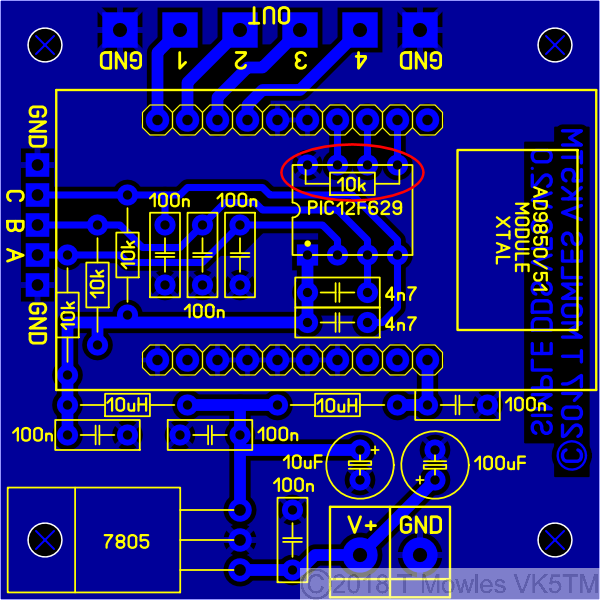
Next, you will need to make up a little wire jumper lead to connect between the two points shown below in orange (this not a permanent jumper, it is only used during the reset procedure).
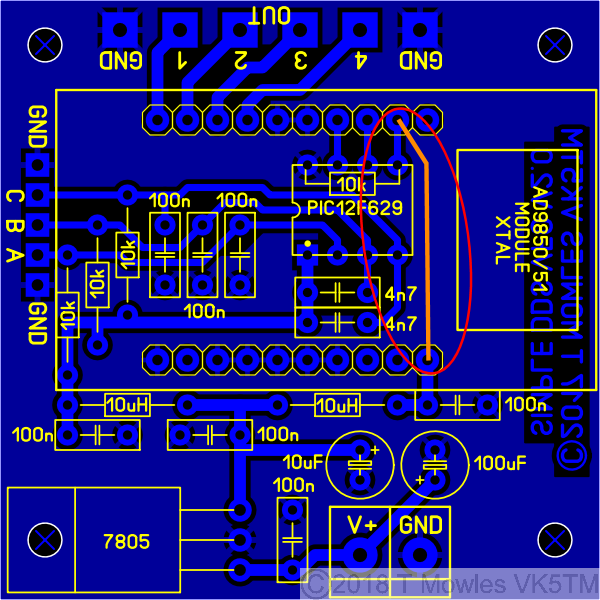
Program your PIC with the software in the downloads section below identified as for use with this mod (currently version 'd') - do not use this version if you haven't/aren't going to modify the pcb, use version 'c'. OK, now on to doing the reset procedure:- 1: With everything powered off, remove the DDS module. 2: Fit the temporary jumper as in the pic above. 3: Power up, leave for a couple of seconds and power down. 4: Remove the temporary jumper, refit the DDS module and carry on as per normal. You can now do another calibration run - no re-programming required. Each time you want to do another calibration, all you need to do is repeat the above procedure.
Calculating and entering different frequencies
For those with Windows systems, it is easier to use the upgraded scientific calculator available for download (in "Programmer" mode). Users of other operating system (or those that don't want to download the calculator), will need a decimal to hex converter program of some sort (unless you are lucky enough to be able to do it in your head). In the 2017_DDS_VFO_V1.asm file, starting at line 97, are several 'EQU' statements for upper frequency limit, lower frequency limit, default start frequency and calibrate frequency. I will use the values currently in the file to show you how to get the numbers. The following sequence applies to all four of the 'EQU' sections (with different numbers of course). Firstly, enter the dec number 5500000 (5.5 million) into your dec to hex calculator/program (I'm not going to tell you how to work your calculator/program, you need to work that out). The HEX number will be 53EC60 Now break this number down into groups of 2, starting from the right hand side:- 53 EC 60 The right hand number is the least significant byte, so you enter 0x60 into the line that says, funnily enough, least significant byte. Enter 0xEC in the next line up and 0x53 into the line above that. The '0x' tells the MPlab compiler that the number is in HEX format. So, where is the most significant byte? Well, in this case, it is 00, because 5500000 only converts to the three bytes just shown. So, if your calculation only gives you three nice even groups of two numbers, the most significant byte will be 0x00. Lets do another one that doesn't give you three nice even groups of two numbers. Enter 17000000 (17 million) into your calculator/program. It should come back with the HEX number of 1036640. Breaking that down into groups of 2 as before gives you: 1 03 66 40. Not so nice even groups of two numbers plus an odd one. To fix that, you put a '0' in front of the 1 to get 01 03 66 40. Because nought is nought (or zero is zero), it has no effect on the calculated value, so you can enter the numbers as before, but the most significant byte will now be 01. Don't forget to put 0x in front of your numbers, otherwise, strange things will happen. Using the AD9850 or '51 modules, the most significant byte will not be any more than 03 hex (which puts you upwards of 50MHz).
LED Indicator Add-on
Note:- it is NOT possible to apply this add-on to the original version of this project. Here is a little add-on that will enable the Simple VFO to indicate the selected step size via 3 LED's. Can be expanded to a total of 9 LED's if you feel so inclined to modify the software.
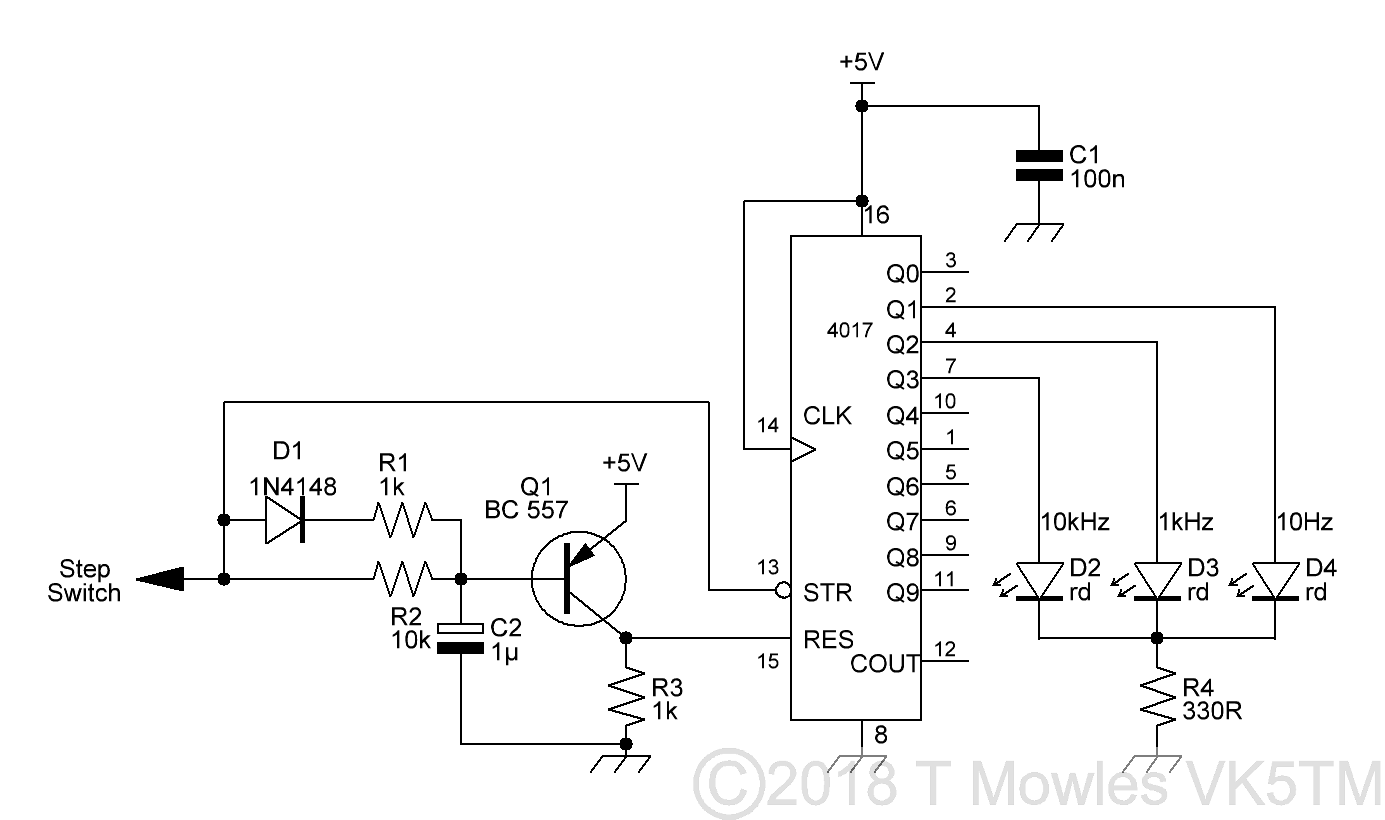
The theory of operation, is that the step switch input, which is held high, will hold Q1 off, thus enabling the 4017 (the reset input is held low by the 1k resistor). Pressing the step switch and pulling the line low causes Q1 to turn on, taking the reset pin high and resetting the 4017. In software, after the step switch has been released, the pin (A on the VFO schematic) is then made an output and after a short delay, a number of short pulses, according to the step size selected (1 for 10Hz, 2 for 1kHz and 3 for 10kHz), are sent to the 4017 to clock the outputs of the 4017 and light the appropriate LED. The combination of R2/C1, having a time constant of ~10mS, prevents Q1 reacting to these short (100uS) pulses. D1 & R1 enable C2 to charge quickly whenever the step switch input goes high. All of this happens fast enough to be transparent to the user, I haven't been able to push the step switch fast enough to upset anything. With so few components, this can easily be constructed on a small piece of stripboard. This is the prototype, made up on a bit of matrix board. Ignore the yellow LED, I used it to indicate when the 4017 was in reset during troubleshooting.

The software - 2017_DDS_VFO_V1-1c.asm (or 2017_DDS_VFO_V1-1d.asm for the calibration mod described above) - is the version to use with this add-on. You may notice a slight flicker from one or other of the LED's when pushing the step switch, that is the 4017 reverting to reset mode.
Downloads
These files are provided free for personal use ONLY. I retain copyright on all works published on this website (unless otherwise specified).
These files, or any derivative of them, may NOT be used in any commercial or profit making enterprise of any kind.
I no longer make the pcb files available because of copyright infringement.
Ham (Amateur) Radio Clubs/Associations, wishing to use this project in a Club Buildathon, as a Club Project or similar are exempt from the above, PROVIDING, any kits or pcbs are sold to club members only. <- Because of copyright infringement, this no longer applies, however, I will do a discount on the price of the pcb's for a bulk purchase. Contact me with your request for details.
Code updated to version 'c' for both versions (ignore the jump from a to c, b was just something I was playing with and decided not to use). The encoder routine has been changed to a modified form of some code that Mike K8LH had posted on the 'net. It is much smaller, does the same job and appears more responsive (but don't try spinning the knob at 100mph, it doesn't like it). (Right click and 'Save as..' or what ever is required by your browser) 2017_DDS_VFO_V1c.asm The ASM file for the VFO. It is set to AD9850 by default. Instructions in the file to change it to AD9851. Default VFO range 5 - 5.5MHz. 2017_DDS_VFO_V1c.hex AD9850 hex file. LED Indicator version of the software 2017_DDS_VFO_V1-1c.asm This is the file to use for the LED indicator add-on. Same settings as the V1 file above. 2017_DDS_VFO_V1-1c.hex The hex file. The following two sets of files are for use with a modifed pcb as described in the calibration reset modification paragraph above. First set is for the standard VFO, while the second set is for the VFO with LED indication. 2017_DDS_VFO_V1d.asm Standard VFO. 2017_DDS_VFO_V1d.hex Corresponding hex file. 2017_DDS_VFO_V1-1d.asm VFO with LED indicators. 2017_DDS_VFO_V1-1d.hex Corresponding hex file. If you are not purchasing a programmed PIC and really, really, really need a HEX file with your custom frequencies, I will create it for you for a $5 US donation (all donations go towards the web-hosting fees). Using a 12F675 I have been asked if the above files will work with a 12F675. Short answer yes, if you modify 3 lines of code. The following file has the changes made (while leaving the original code in so you can see what changes). You need to look at lines 62, 71 and 277 and make the same changes in any of the above files to make them work with a 12F675. 2017_DDS_VFO_V1c_12F675.asm 12F675 version of 2017_DDS_VFO_V1c.asm. Old Files The zip file below contains a pdf copy of the original page that was here as well as all the files that were available to download previously. VK5TM Simple dds vfo.zip
RE-PROGRAMMING PROBLEMS: I have had reports of people not being able to re-program their PIC's. This is a programmer problem. Some programmers do not explicitly follow the programming protocols of these chips and apply both Vdd (5v supply) and Vpp (programming voltage) at the same time. When these voltages are applied in this fashion, the PIC starts to run the program and the programmer is unable to capture the pins necessary to perform the programming. (Also, some programmers, in "Erase" mode will wipe out the "OSCCAL" value in the chip which will also cause problems. Do an internet search on Osscal calibration and read up on fixing this problem). There are several solutions to the re-programming problem: 1/ Look for a menu option in your programming software to see if there is an "Assert Vpp first" or similar worded option. 2/ If that option is not available, you may be able to modify your programmer by fitting a 47 - 100 ohm resistor in series with the 5v line to the PIC and adding a 47uf cap to ground at the 5v pin of the PIC. DO NOT try this if you are not sure or don't have the requiste skills to do it. Note that I have not tried this, but it is mentioned as an option on several forums dealing with PIC's and programming. 3/ Borrow or buy a programmer that is capable of asserting Vpp first. The PicKit 2 & 3 are two I know of that can do this and I have confirmed that they do work to rescue the PIC.
